[Challenge 4] Flag Vault
We get given another website, with this description:
Ooooh!
Good work! I think we've made it into the vault, where they keep the most valuable of flags! These flags appear to be super strength, and don't have as much a pattern to them, and it might be easy to get distracted by decoys...
Anyways! I'm sure you're up to it!
Upon navigating to the site, we get led to a portal requesting a secret key:

If we start to input any text into the text field, a few coloured icons show up to the right of it:

Using the web browser's integrated debugger in the developer tools, we can find the source code for the website.
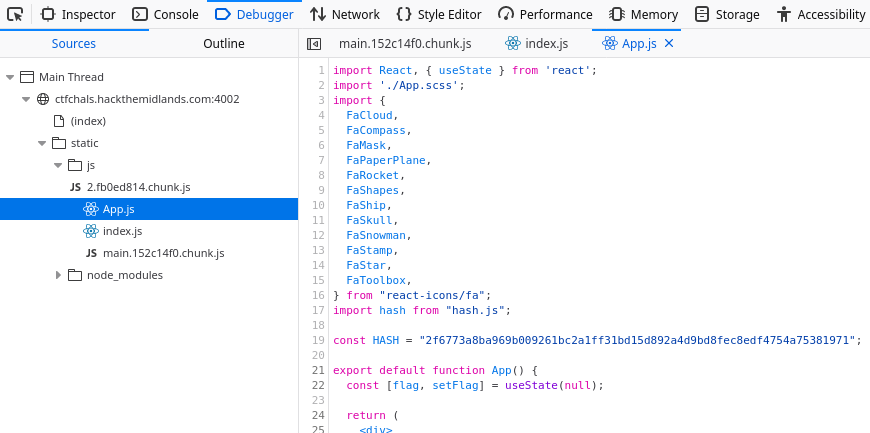
We can see that this is a ReactJS application, from the first line which imports React, but also from the usage of mixed Javascript and HTML snippets (known as JSX), which is a key feature of React.
We can extract the important parts of the code
const HASH = "2f6773a8ba969b009261bc2a1ff31bd15d892a4d9bd8fec8edf4754a75381971";

function Login({ setFlagValue }) {
  const [value, setValue] = useState("");

  function onChange(event) {
    setValue(event.target.value);
  }

  function click(event) {
    event.preventDefault();

    let v = hash.sha256().update(value).digest('hex');
    if (v === HASH) {
      let flag = hash.sha256().update("SALTY").update(value).digest('hex');
      setFlagValue(flag);
    } else {
      alert("wrong password!");
    }
  }

  const valueHash = hash.sha256().update(value).digest('hex');
  const h1 = parseInt(valueHash.slice(0, 8), 16) % icons.length;
  const h2 = parseInt(valueHash.slice(8, 16), 16) % icons.length;
  const h3 = parseInt(valueHash.slice(16, 24), 16) % icons.length;
  const c1 = 360 * parseInt(valueHash.slice(24, 28), 16) / 65535;
  const c2 = 360 * parseInt(valueHash.slice(28, 32), 16) / 65535;
  const c3 = 360 * parseInt(valueHash.slice(32, 36), 16) / 65535;

  ...
}
When we click the login button, we take the SHA256 hash of the input field, converting it to hex, and then comparing it to the desired hash, which is "2f6773a8ba969b009261bc2a1ff31bd15d892a4d9bd8fec8edf4754a75381971".
We can then see that if the password is correct, we take the correct password, concatentate it to a "SALTY" value and then hash that to produce the flag. So, the password check isn't something we can just skip here - it's essential to deriving the flag, so we do need to find the password.
The first trick we could do is use some online tool to see if the hash exists online. We could try google:

Or crackstation:

But no dice. We could attempt to brute-force the hash ourselves, but that'd take a long time, so it's probably worth looking around a bit more before going for that approach.
At the bottom of the page, we see a link to a demo, which is an mp4 video file (link here).

If we watch the video, we can see someone enter a password, character by charater. However, on each new character the icons update one by one - and from the code above, we know that the colours and icons chosen depend on the generated hash.
This massively reduces the entropy of the password! Instead of having to guess an entire character, we can guess each character, one at a time, and check it against the icons+colour in the video!
If we go about following this process, we can find the password: "Pr3tTy-9R00vY-T0-m3".
When we enter this password, we get taken to a new screen:

And we get the flag: "HTM{235705b80479d6c48b92c685ab0cbab338a50d02c5d20f28fb35149bfce31a4b}"